
🎉 TAO August 2026 Release Highlights! 🎉
TAO Knowledge Base
After the launch of the new TAO Knowledge Base last month, we are continuing to provide additional articles and playbooks aimed to improve the user experience by focusing TAO workflows.
Unlike the User Guide, which serves as a comprehensive reference for every available feature in TAO, the Knowledge Base is organized around user roles, tasks, and step-by-step walkthroughs. While the User Guide answers the question, "What can I do in TAO?", the Knowledge Base is designed to answer "How do I accomplish this task?"
The Knowledge Base now includes the following guides:
-
Test taker guides provides a video demonstration and corresponding articles designed specifically for test takers.
-
Workflow of creating and previewing tests provides an end-to-end overview of the test publishing workflow designed for new users.
-
How to configure automatic navigation provides a centralized reference for configuring automatic navigation within a test.
Accessibility overrides for custom stylesheets
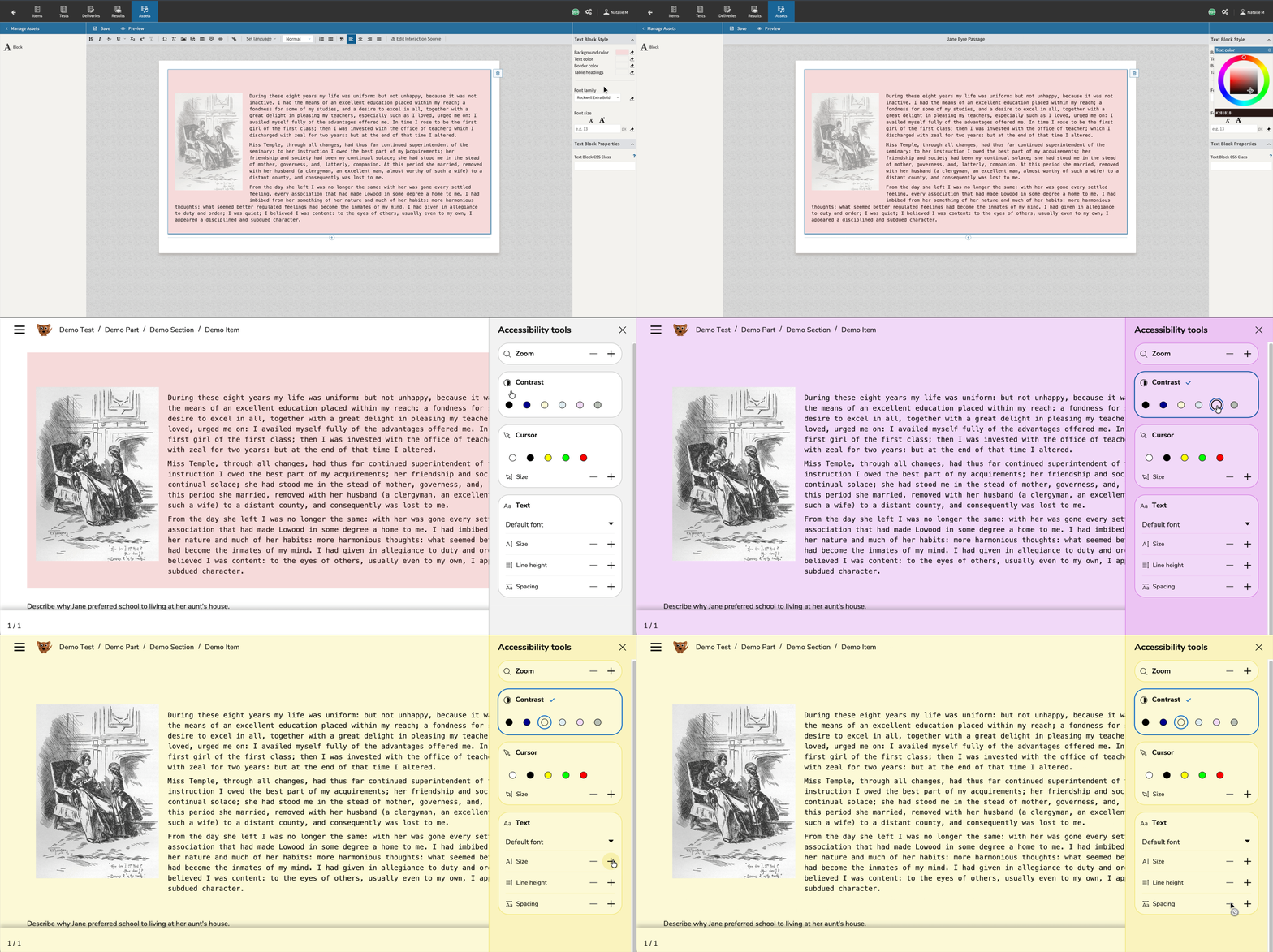
Accessibility settings can override customer-provided item and passage stylesheets. This enhancement improves support for font, size, and contrast accommodations. For more information, see Item style editor.
Breadcrumb tile customization
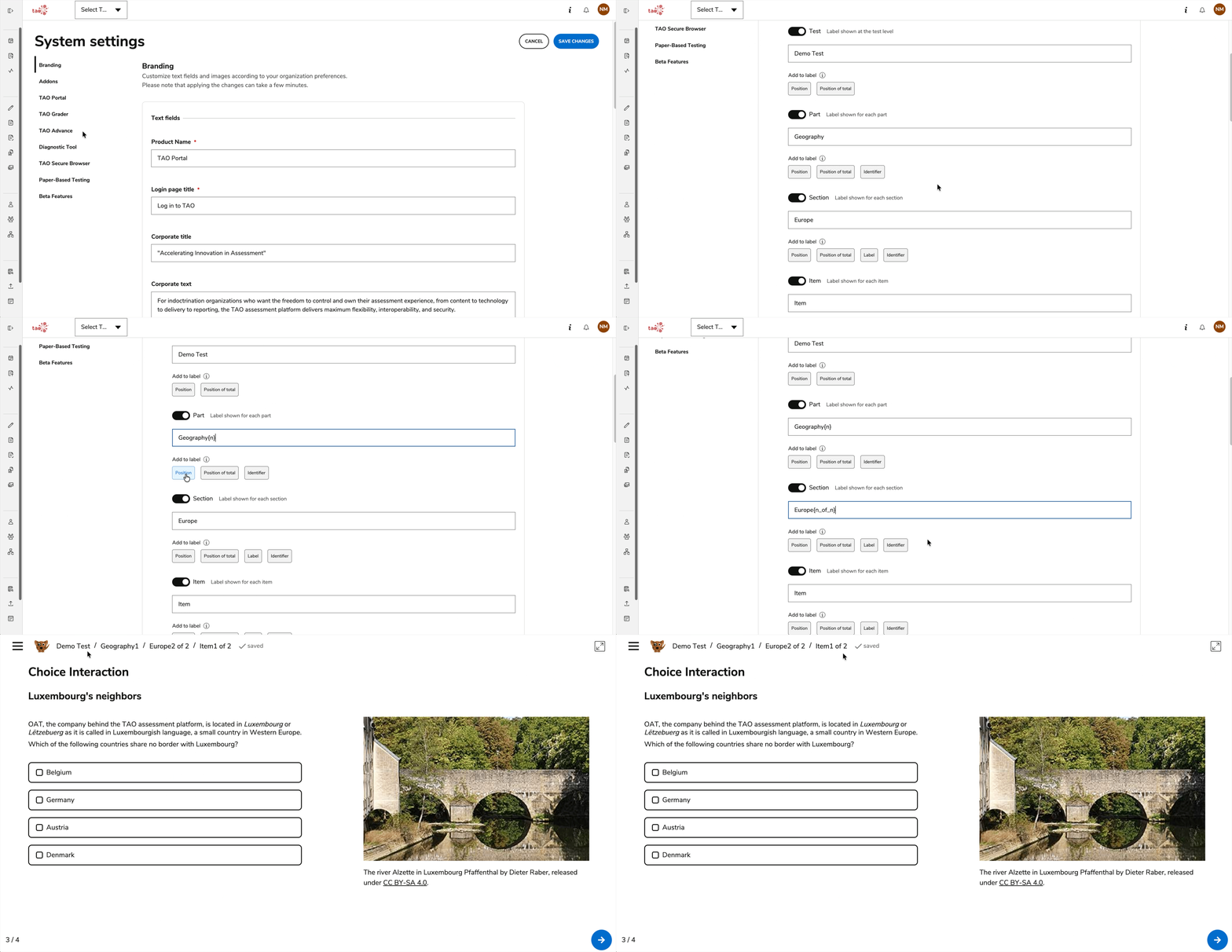
Assessment program managers can configure test-part breadcrumb labels and use placeholders such as the position, authored label, and authored ID. For more information, see System Settings.
Release enhancements
TAO Authoring
Features and improvements
-
Configurable Slider interaction orientation: Authors can configure Slider interactions with horizontal or vertical orientation, and reverse the direction of the scale. These enhancements are configured with responsive rendering and adapted keyboard navigation. See Slider interaction.
-
Configurable choice positions for Associate interaction: Authors can configure the position of choices in Associate interactions at the top, bottom, left, or right of the answer area. This enhancement is configured with responsive rendering and adapted keyboard navigation. See Associate interaction.
-
Configurable choice positions for Gap Match and Graphic Gap Match interactions: Authors can configure the position of choices in Gap Match and Graphic Gap Match interactions at the top, bottom, left, or right of the answer area, with responsive rendering and adapted keyboard navigation. See Gap Match interaction and Graphic Gap Match interaction.
Bug fixes
-
Bug fix: Fixed an issue that caused item or test preview to fail after 10 consecutive launches.
-
Bug fix: Fixed an issue where the incorrect maximum value of one when authoring “order single list” or “sort from source to target list” interactions.
-
Bug fix: Replaced images within the Text Reader PCI now display consistently in assets while authoring or previewing and item, and during live delivery. Previously replaced images sometimes showed the previous image or returned a 404 error.
-
Bug fix: Pagination controls now remain available after uploading a new asset in the Asset Browser, allowing authors to continue navigating across asset pages without reloading the page.
-
Bug fix: The Tangent option in Math Entry interaction properties now remains disabled after being unticked and saved, keeping the configuration consistent with the interaction toolbar.
TAO Portal
Features and improvements
-
Test-taker password updates via Dynamic Query API: Authorized clients with the required
reset-passwordscope can now update a test taker’s password through the Dynamic Query API. -
Hierarchy import improvements: CSV hierarchy imports now support parent and child organizational units listed in the same file regardless of order, with bulk processing improvements that increase performance and reliability for large imports.
-
New UI locales: French (Belgium), Dutch (Belgium), and German (Belgium): The TAO Portal interface is now available in French (Belgium), Dutch (Belgium), and German (Belgium). All TAO-generated UI strings are translated and validated for these locales.
Bug fixes
-
Bug fix: Restored the diagnostic-tool link on the login page and corrected the URL used when launching the tool.
-
Bug fix: Session and Paper Session lists now wrap text correctly as the screen narrows, reducing unnecessary horizontal scrolling and keeping session information easier to access.
-
Bug fix: On the TAO Portal Deliveries page, Content Developers can now preview deliveries and export them as DOCX files, in line with the Portal permission model. See Using deliveries in TAO Portal.
-
Bug fix: Users whose test-taker role has been removed can no longer access test-taker sessions or receive an incorrect role-selection prompt.
-
Bug fix: Group Managers retain access to their Sessions tab, session overviews, and reports when all assigned groups are deactivated.
-
Bug fix: The “Verify Your Email” and “Cookies” banners now appear only once after a user changes the system language, using the newly selected language.
-
Bug fix: “Completed” and “Terminated” session statuses now use distinct French translations.
-
Bug fix: The “Custom Session name on waiting page” setting now remains saved when reopening and editing Session execution settings.
TAO Advance
Features and improvements
-
Live Monitoring for not-started test takers: Proctors can now view test takers who have not yet started a session in a dedicated “Not Started” tab; their assigned Battery or Delivery will also display. See Managing test takers during a live session.
-
Assessment watermarking: TAO Advance supports a unique test watermark to test takers during assessment delivery. This enhancement helps discourage content leakage. See Watermark for session delivery.
-
Informational-only submission confirmation: Test parts containing only informational items, when completed during a session, now show a confirmation without misleading references to answers and offer “Cancel” instead of “Review my answers”. See Test navigation for test takers.
-
Configurable text-to-speech voices: Administrators can configure TextHelp voice mappings for supported languages in System Settings, and Read Aloud uses those voice mappings during delivery. See System Settings.
-
Shortcut prevention updates: When shortcut prevention is enabled, configured shortcuts are now blocked more consistently while permitted OS-level, browser, and special input shortcuts remain available. See Command and shortcut restrictions.
-
New UI locales: French (Belgium), Dutch (Belgium), and German (Belgium): The TAO Advance interface is now available in French (Belgium), Dutch (Belgium), and German (Belgium). All TAO-generated UI strings are translated and validated for these locales.
Bug fixes
-
Bug fix: Test takers now continue with the delivery list that existed when a battery session was first launched, even if the battery is later edited.
-
Bug fix: Fixed an issue where the logout option in the hamburger menu did not work during a delivery session.
-
Bug fix: Selecting the default accessibility font no longer overrides the customer-configured theme font. When disabled, the customer-configured theme font is restored.
-
Bug fix: Fixed the display of submitted and correct answer order for “order single list” interactions during test review.
-
Bug fix: Choice interactions now keep constrained maximum choices consistent between the UI and the saved response state.
-
Bug fix: Test takers can no longer drag images from the item content and use them as part of their response.
-
Bug fix: MathEntry content now loads the required Symbola font correctly, removing the related console error and improving mathematical expression rendering.
TAO Grader
Features and improvements
-
New UI locales: French (Belgium), Dutch (Belgium), and German (Belgium): The TAO Grader interface is now available in French (Belgium), Dutch (Belgium), and German (Belgium). All TAO-generated UI strings are translated and validated for these locales.
Bug fixes
-
Bug fix: Scorers, reviewers, administrators, and group managers can open scored tasks in read-only mode from “View scores”.
-
Bug fix: Read-behind submission now works reliably in TAO Grader.
TAO Insights
Bug fixes
-
Bug fix: Group Managers can now access individual test-taker reports from the session overview.
-
Bug fix: Failed test-taker sessions are now displayed as “failed” rather than “passed” in the session report.
-
Bug fix: Datastore Activity Logs now include recent actions, not just older records.