
🎉 TAO April 2026 Release Highlights! 🎉
Paper-based testing
TAO Portal now provides the possibility to bridge the gap between full paper based testing and digital online assessments. The Paper sessions feature allows this through the creation of test booklets that can be printed, completed with pen and paper, then scanned and reintroduced in TAO’s digital assessment flow.
For more information, see Paper-based sessions.
If you are interested in enabling this feature, please contact your Account Manager.
Expanded whitelisting capabilities
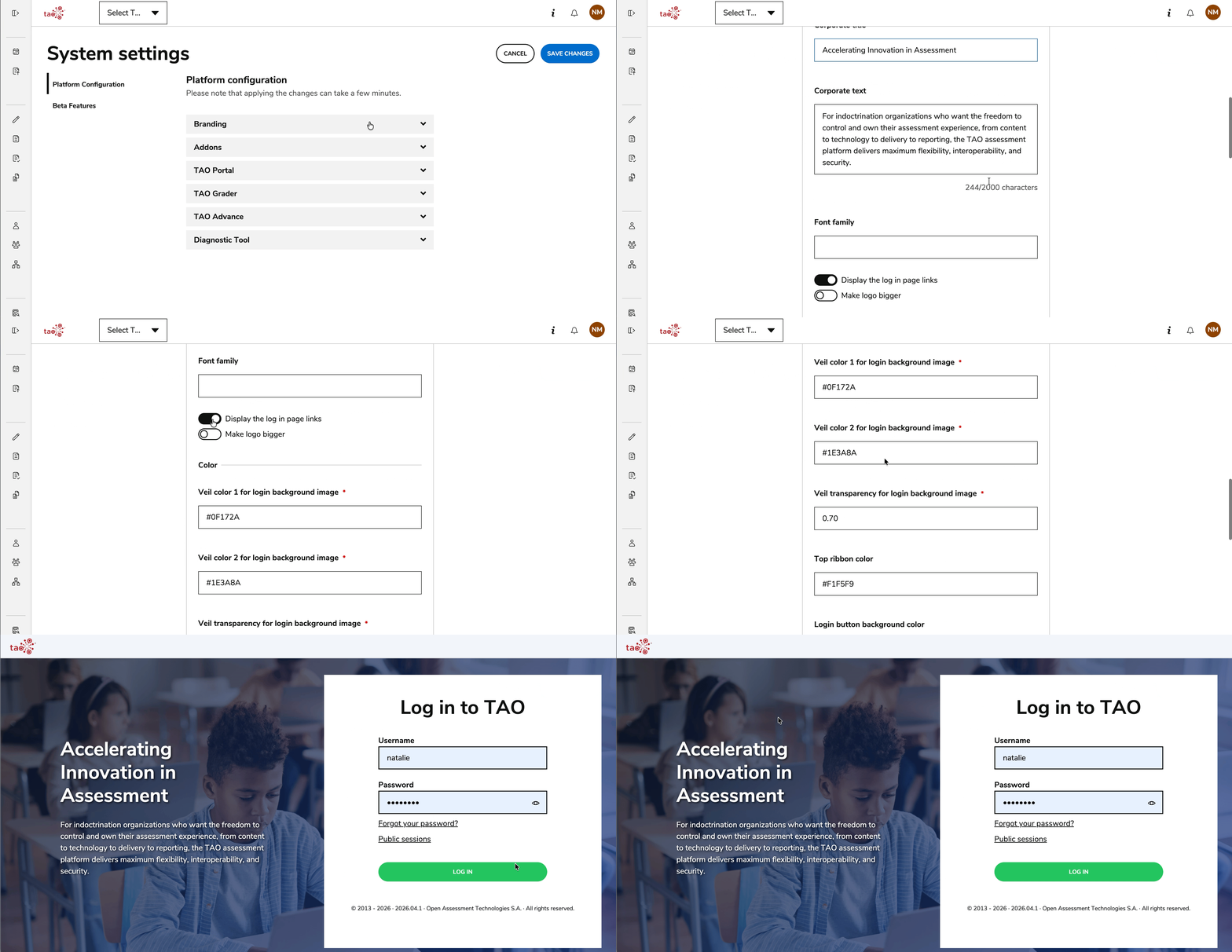
Additional configuration options for branding are available in System Settings; these options include defining a veil color for the login page, adding a ribbon, or further customizations for the logo and font that display for the entire account.
For more information, see System Settings - Branding.
Time-out configuration for timed tests
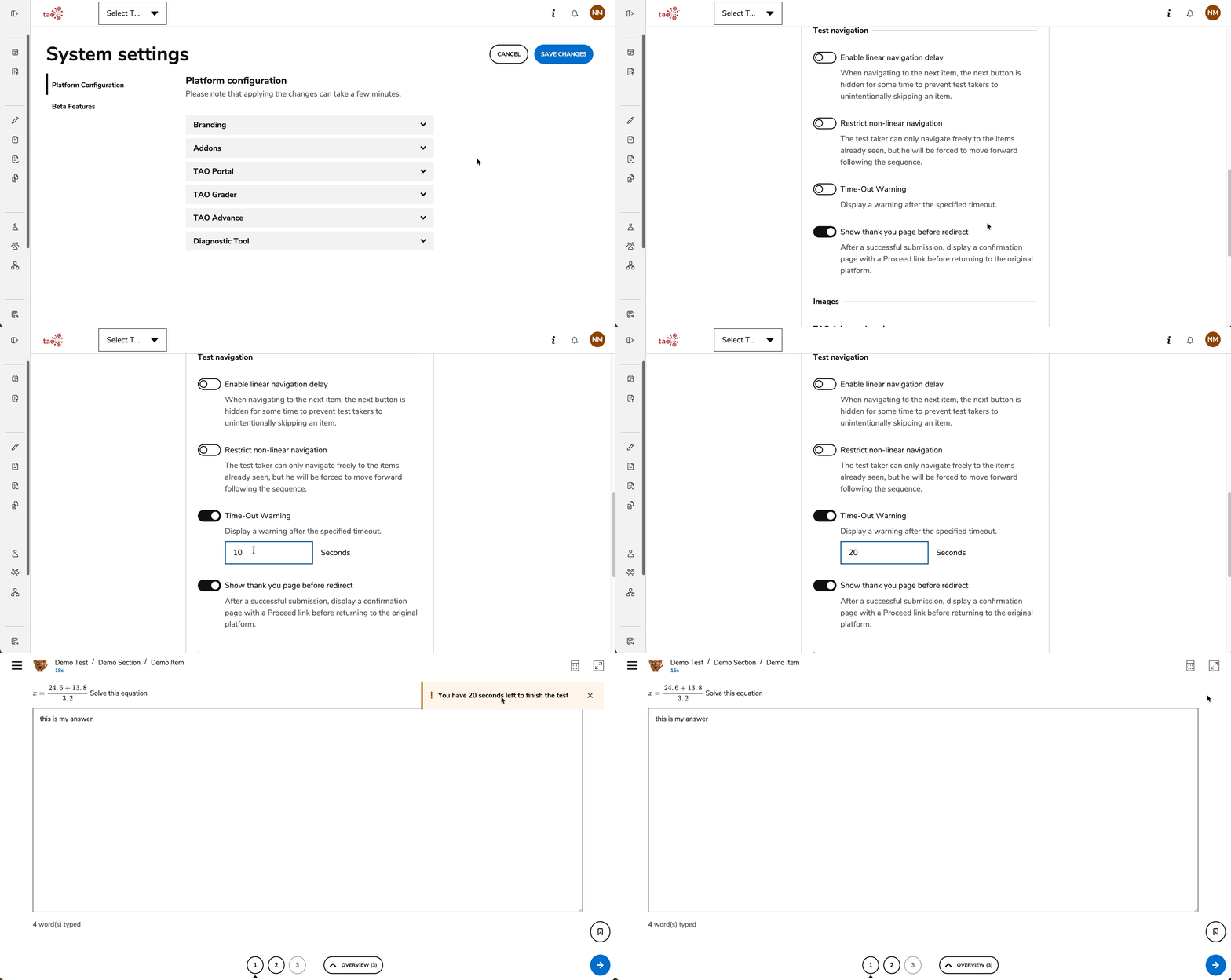
Introduced the possibility to display a warning notification to test-takers before a test’s timer expires. This functionality can be globally enabled and configured for the entire account within System Settings, and only applies to test timers (not parts, sections, or items).
For more information, see System Settings - TAO Advance.
Release enhancements
TAO Authoring Updates & Fixes
-
Arrow mode introduced for the Graphics Associate interaction: The Graphics Associate interaction can now be configured with an arrow mode to be used for the associations. With this mode enabled, an arrow displays as a start and end point for each association. For more information, see Graphic Associate Interaction.
-
Bug fix: Fixed an issue where clickable areas in Graphical Hotspot interactions did not display exactly where authors placed them; the borders of clickable areas are also improved for a clearer display.
TAO Portal Updates & Fixes
-
My sessions tile customization: Introduced the possibility to customize the “look & feel” of tiles under My Sessions, as well as the information displayed within each tile. This functionality can be globally enabled for the entire account within System Settings. For more information, see System Settings - TAO Portal.
-
IP-change proctoring re-authorization: Introduced the possibility to trigger a proctoring re-authorization if the public IP for an ongoing session changes during its execution. This functionality can be globally enabled for the entire account within System Settings. For more information, see System Settings - TAO Portal.
-
Read-Behind enablement as a beta feature: Introduced the possibility to enable or disable the read-behind manual scoring ability in TAO. This functionality can be globally enabled as a beta feature for the entire account within System Settings (previously this feature could only be enabled for individual sessions). For more information, see System Settings - Grader.
-
Batch scoring configuration: Introduced the possibility to enable or disable the batch manual scoring feature in TAO, as well as configuring the maximum number of test-takers in a batch. This functionality can be globally enabled and configured for the entire account within System Settings. For more information, see System Settings - Grader.
-
Confirmation page after test submission: Introduced the possibility to display a confirmation page as soon as a test is successfully submitted by the test-taker. This functionality can be globally enabled for the entire account within System Settings. For more information, see System Settings - TAO Advance.
-
Diagnostic tool: Introducing the Diagnostic Tool as a way to perform meaningful pre-test system checks (bandwidth, browser, connectivity, security prerequisites, environment compatibility). This functionality can be globally enabled and configured for the entire account within System Settings. For more information, see Diagnostic Tool.
TAO Advance Updates & Fixes
-
Lockdown browser support: Introducing initial support for lockdown browsers, to further increase the security of online assessment sessions. To configure this behavior for your environment, please speak to your Account Manager. For more information, see Secure Browser.
-
Wiris MathType integration for entering math expressions: Added additional support for test-takers with the Wiris MathType integration; this tool helps test-takers enter math formulas using the WYSIWYG editor from Wiris or through touch-enabled devices during their tests. If you are interested in enabling this feature, please contact your Account Manager. For more information, see System Settings - Addons.
-
Bug fix: Fixed an issue where test‑takers could bypass the maximum number of Audio Recording attempts in non‑linear tests. Any defined maximum attempts are now correctly enforced.