
🎉 TAO July 2026 Release Highlights! 🎉
Introducing the TAO Knowledge Base
We're excited to announce the launch of the new TAO Knowledge Base: a task-focused learning resource designed to help you accomplish common workflows.
Unlike the User Guide, which serves as a comprehensive reference for every available feature in TAO, the Knowledge Base is organized around user roles, tasks, and step-by-step walkthroughs. While the User Guide answers the question, "What can I do in TAO?", the Knowledge Base is designed to answer "How do I accomplish this task?"
The Knowledge Base includes several types of resources to support different learning styles and use cases:
-
How-to articles provide concise, step-by-step instructions for completing common tasks.
-
Video tutorials offer visual demonstrations of key workflows and features.
-
Best practices share recommendations and guidance for more advanced or complex scenarios.
-
Playbooks walk through end-to-end processes that span multiple areas of TAO, helping you complete larger workflows from start to finish.
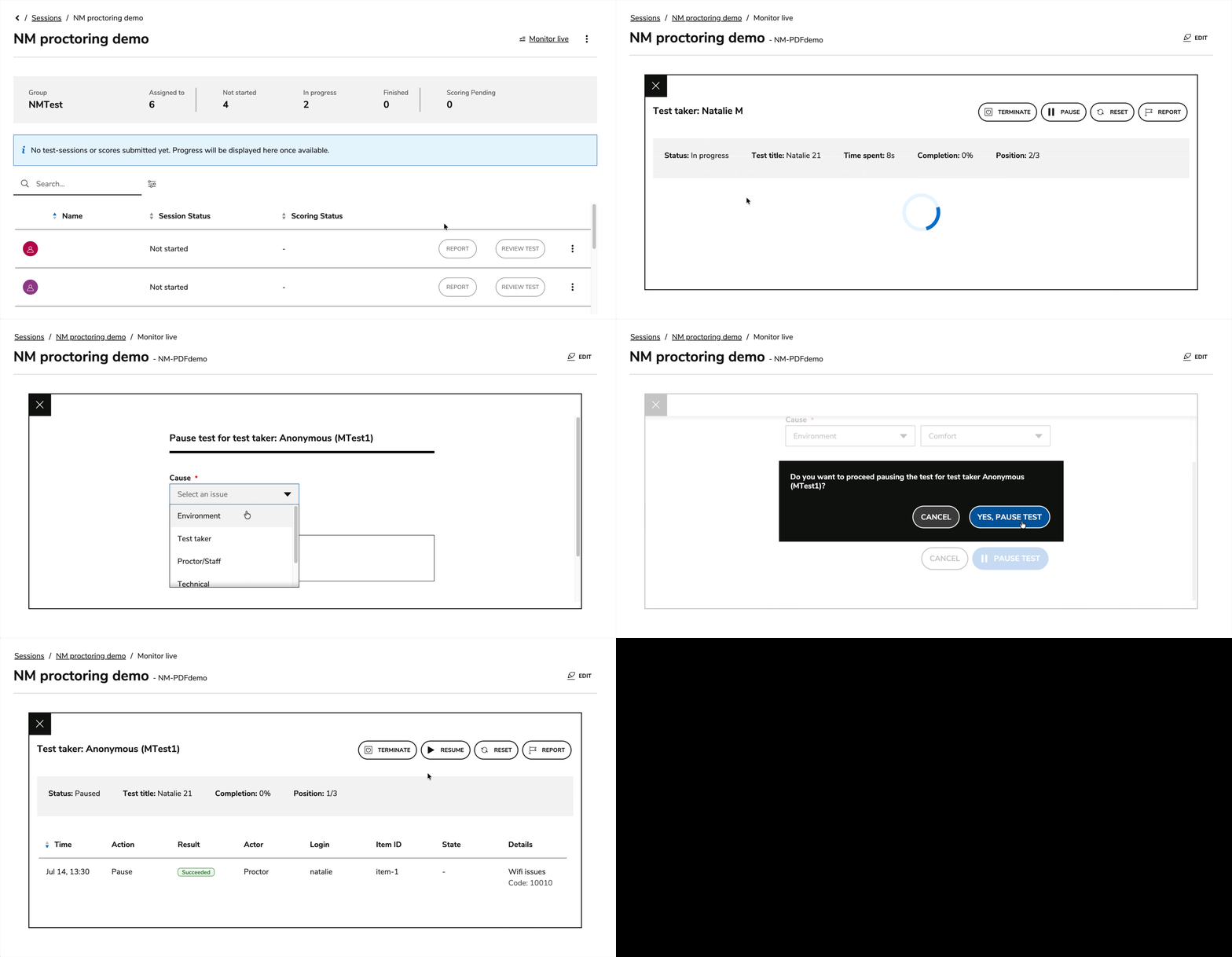
Live monitoring event history for test takers
Proctors can access a candidate’s proctoring event history directly from the detailed test-taker view in live monitoring. For more information, see Managing test takers during a live session.
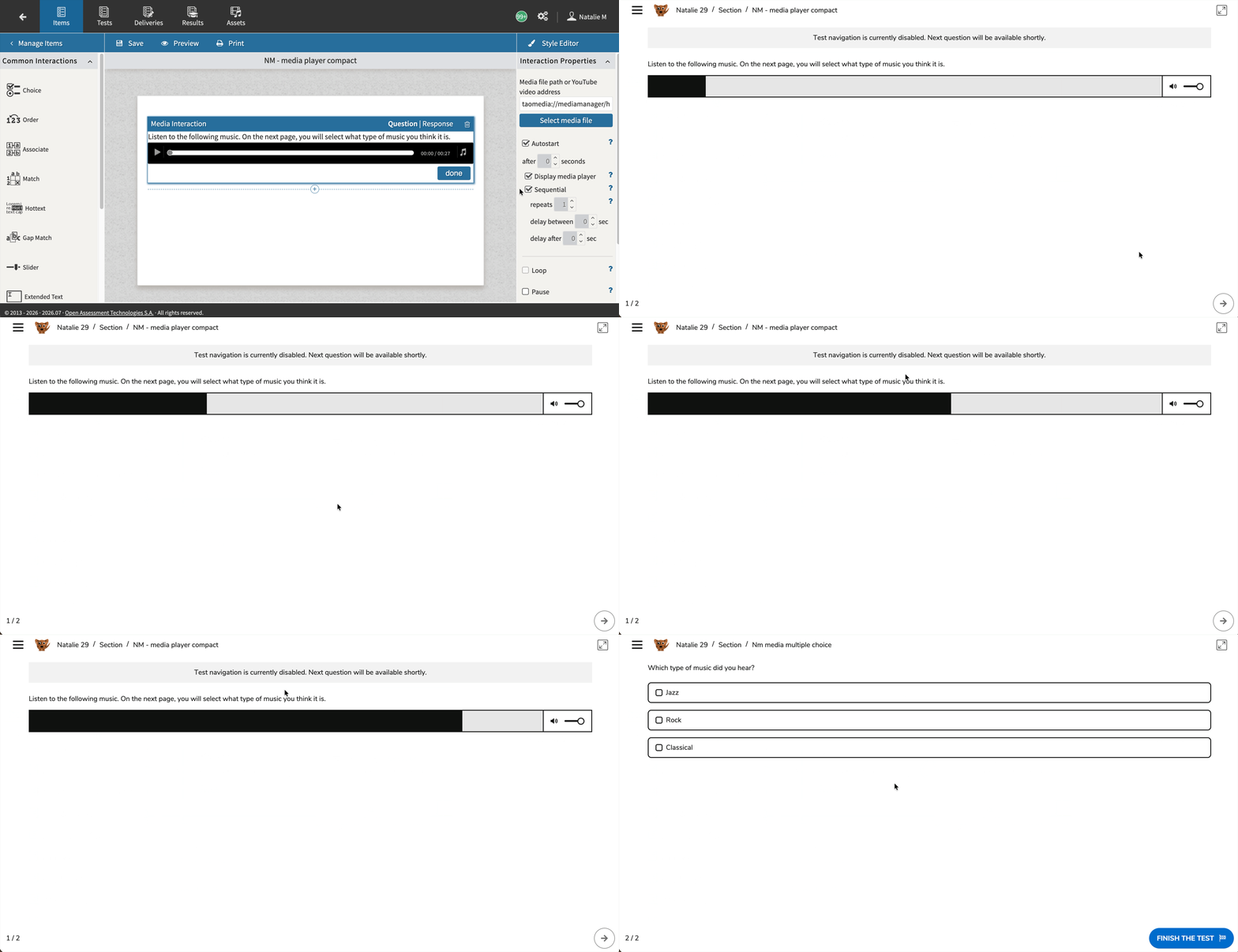
Manual navigation disablement for auto-progressing items
Items can now disable the submit-and-advance control and display a localized notification when configured for automatic progression. Please note that, for navigation disablement to work, items where it is applied must also be configured for automatic/sequential progression. For more information, see Media interactions and Test categories.
Release enhancements
TAO Authoring Updates & Fixes
-
Bug fix: Authors can now correctly define responses for Order interactions and move response blocks as expected.
TAO Portal Updates & Fixes
-
Configurable Test Review start/end dates: Session-level review availability can now be controlled with start and end dates, including support for CSV import, reducing the need for manual operational interventions. For more information, see Creating a session.
-
System Settings improvements: System Settings now benefit from improved navigation, clearer field-level validation messages, and a wider layout to accommodate for the ever growing list of options available there. For more information, see System Settings.
-
Hide inactive users and groups by default: Inactive (deactivated) users and groups are now filtered out by default in the users and groups pages. A filter option is available to show them when needed. This significantly improves user management efficiency for organizations with many deactivated entries.
-
Bug fix: Logged-in users are no longer incorrectly returned to Public Sessions after navigating through the logo and logging in; they are now directed to the Portal home page instead.
-
Bug fix: The mappingRules.csv template is no longer available for download as part of the Bulk CSV import default templates.
-
Bug fix: Users created in a lower-level organizational unit are no longer automatically reassigned to the Root organizational unit when added to a group during creation.
-
Bug fix: CSV import reports now show the correct “rejected” status for failed user imports instead of displaying a raw 400 error code.
-
Bug fix: Users created without an assigned role are no longer automatically deactivated after their profile is edited and saved.
-
Bug fix: The deliveries list in Session configuration now sorts correctly, showing deliveries alphabetically and latest compiled versions first.
-
Bug fix: Text in the Sessions and Paper Sessions lists now wraps correctly on smaller screen widths, reducing unnecessary horizontal scrolling.
TAO Advance Updates & Fixes
-
Improved attachment handling during delivery: Attachment support was enhanced so test-takers can access learning materials more reliably. Supported formats can be previewed inline, while unsupported formats are offered for direct download instead of opening in an unsupported previewer. For more information, see Test Categories.
-
Test-runner logo via LTI parameter: Organizations can select the TAO Advance logo through an LTI parameter, enabling launch-specific branding and language-specific templates. For more information, see Custom Parameters.
-
Video recording interaction: A new video recording PCI is now available in TAO Authoring, and is supported by TAO Advance. This interaction supports assessment scenarios where test takers need to respond by recording video. For more information, see Video recording interaction.
-
Bug fix: Items that contain a Media Interaction alongside another interaction are now marked correctly as answered in the navigation panel when the test-taker responds to the other interaction without playing the media.
-
Bug fix: URL-based media now starts automatically when the autostart option is selected for a Media Interaction.
-
Bug fix: Inline feedback in test-taker review mode is now displayed from the first click on highlighted text.
TAO Insights Updates & Fixes
-
Bug fix: Individual Reports for Linear Battery Sessions now display the correct total score and pie chart values in both test-taker and administrator views.
-
Bug fix: Individual reports now show the correct test-taker label in the “time spent per question” widget instead of displaying “undefined”.