
Related articles
Applies to
Personas
-
Content developers
-
Scorers
Prerequisites
Before following this playbook, you should:
-
Have permission to create or edit items in TAO Authoring.
-
Understand the assessment's scoring requirements and rubric.
-
Know which items or interactions require manual scoring.
Purpose
When creating items for human grading in TAO, the most important concept is the scoring trait. In TAO Authoring, scoring traits are configured as Outcome Declarations. An item must contain at least one valid scoring trait in order for its responses to appear in TAO Grader. An item can include as many traits as needed, for example to score grammar, fluency, understanding, or word choice separately.
This playbook explains how to configure scoring traits, design effective grading criteria, and validate your items so they are ready for use in TAO Grader.
Recommended Workflow
When authoring items for manual scoring, follow these phases:
-
Plan the scoring model.
-
Configure scoring traits in the item.
-
Optionally add grading criteria and rubrics.
-
Validate scoring configuration.
Workflow
1. Plan your scoring model
Before creating the item, determine how learner responses should be evaluated.
Consider questions such as:
-
Will the response receive a single overall score?
-
Will multiple dimensions (for example, grammar, fluency, or reasoning) be scored separately?
-
Will graders require a detailed rubric?
-
What score range should be available for each scoring dimension?
Planning these decisions before authoring helps ensure a consistent grading experience and meaningful scoring data.
2. Configure scoring traits
Every item intended for manual scoring must include at least one valid scoring trait. Without a valid scoring trait, learner responses will not appear in TAO Grader.
Scoring traits are configured as Outcome Declarations.
To create a scoring trait:
-
Select an interaction within the item.
-
Enable Response mode.
-
Scroll to the Outcome Declarations panel.
-
Create one or more scoring traits by selecting Add an outcome for each trait.
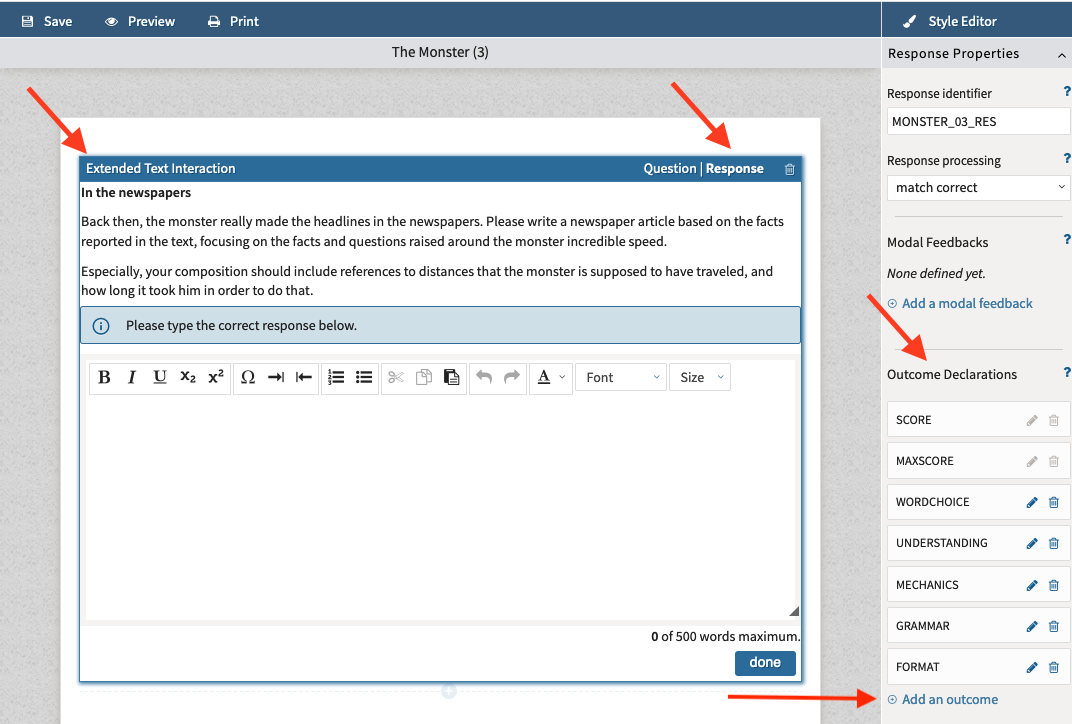
Although this panel is accessed through an interaction, the scoring trait is created at the item level, making it available for grading the entire item.
3. Configure each scoring trait
Each scoring trait contains several settings that determine how grading behaves.
|
Identifier |
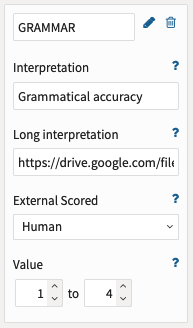
The identifier is the technical name of the trait and is used to identify the grade in the raw data results. |
|
Interpretation |
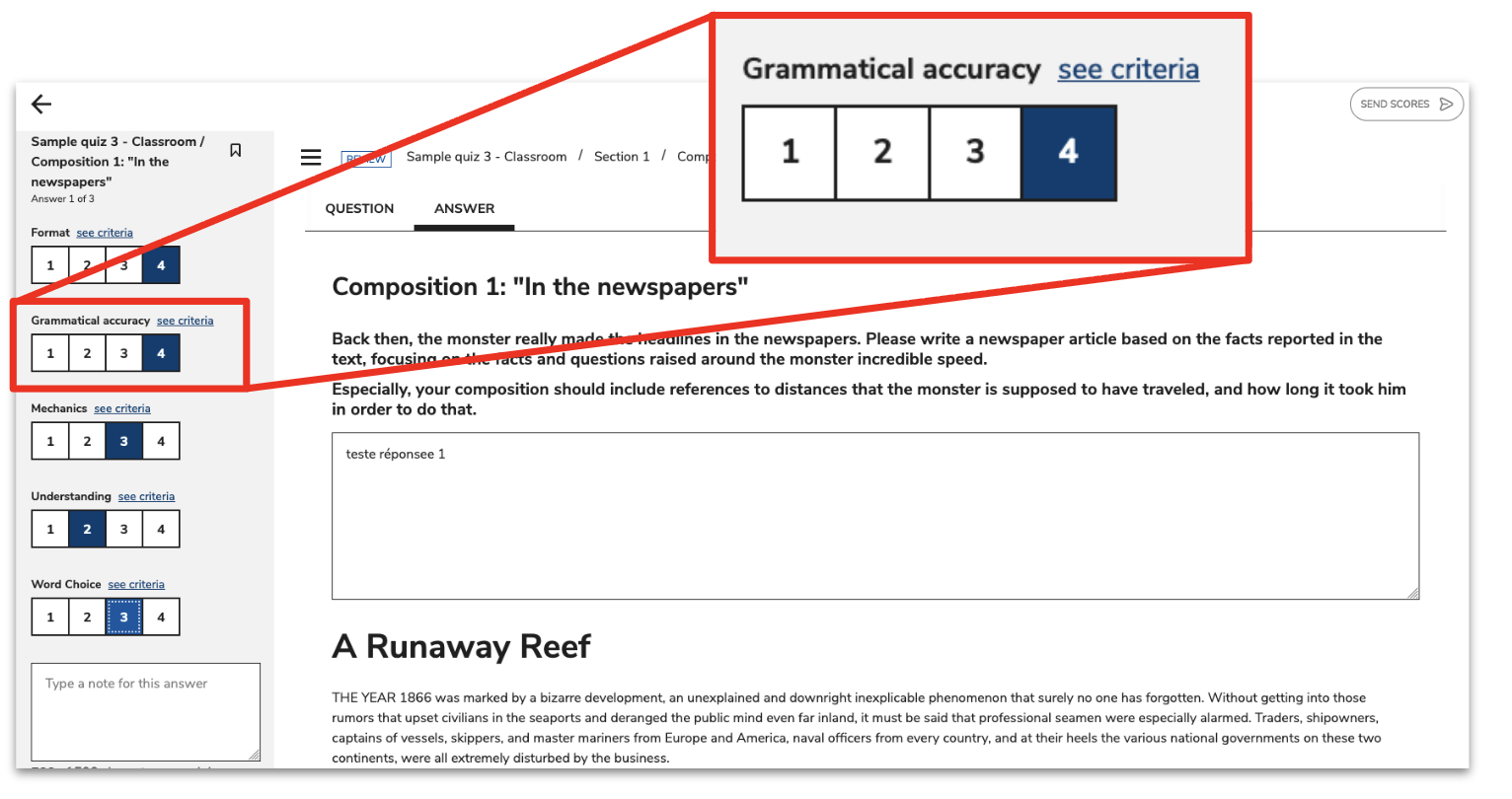
This is the label shown to graders in the TAO Grader interface. It should therefore be clear and user-friendly. |
|
Long interpretation (optional) |
This field contains a link to a hosted PDF rubric. In TAO Grader, that rubric is opened through the see criteria link during scoring. See the section below for more details. |
|
External Scored |
Important: This value must be set to Human for manual scoring. |
|
Value |
This defines the score range available to graders. For example, a value range from 1 to 4 produces four grading buttons: 1, 2, 3, and 4. Choose score ranges that aligns with the scoring rubric, if configured. |
Rubric link requirements
When a rubric is provided through the Long interpretation field, the linked PDF must be:
-
publicly accessible
-
displayable in an iframe
For Google Drive files, the link should end with /preview rather than view or edit, otherwise the rubric will not display correctly in TAO Grader. For more information, see How to add a rubric for a manually scored item.
Rules for configuring the Value score range
A scoring trait must use a valid score range. A valid range:
-
uses integer values only
-
does not use decimals
-
has a minimum lower than the maximum
-
has a maximum greater than 0
If the score range is invalid, the responses will not be displayed in TAO Grader.
Example of how an outcome declaration appears in TAO Grader
4. Important clarification: grading is done at the item level
Although scoring traits are configured while editing an individual interaction in Response mode, they apply to the entire item.
This distinction is important for complex items containing multiple interactions.
Grading is performed at the item level, meaning:
-
All scoring traits belong to the item.
-
Scores are recorded for the item as a whole.
-
Traits are not tied to individual interactions.
7. Validate the scoring method
-
Confirm that:
-
Every manually scored item contains at least one scoring trait.
-
Each scoring trait has a meaningful identifier.
-
Interpretation labels are clear and descriptive.
-
Any rubric links are public.
-
External Scored is set to Human.
-
Score ranges are valid.
-
-
Select Preview in the Action bar to view the item as it appears to test takers and validate if the scoring configuration behaves as expected. For more information, see Previewing an item.