
Related articles
Applies to
-
Administrators
Prerequisites
-
Access to the Data Explorer feature in TAO Portal.
-
Knowledge of the Proctoring Acs Log entity.
Purpose
This document provides a practical guide to the ProctoringAcsLogs datastore in Data Explorer. This entity supports post-exam test taker analysis. Its purpose is to help to understand what type of evidence each datastore contains and how that information can be used to reconstruct a test taker’s behavior during an exam session.
The guide focuses on the most relevant fields for analyzing progress, interactions, responses, technical issues and proctoring-related incidents.
How to access the data
-
Open Data Explorer module.
-
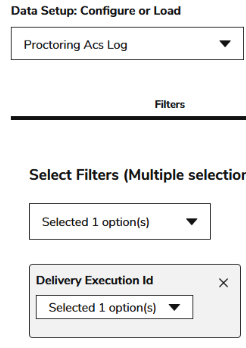
In the ‘Data Setup: Configure or Load’ dropdown list, select Proctoring Acs Log.
-
In the ‘Filters’ tab, filter by the test taker’s ‘login’ field or by ‘deliveryExecution Id’ (represents the concrete exam session for a test taker in a given delivery).
-
Click Generate.
Datastore ProctoringAcsLogs details
proctoringAcsLogs stores operational and incident-related logs generated during a proctored assessment session. Its purpose is to provide a detailed audit trail of what happened during test delivery from a proctoring and monitoring perspective.
The dataset typically combines three kinds of information:
-
test taker activity and security events
-
Proctoring incidents and monitoring outcomes
-
Technical delivery and frontend diagnostics
Overall, proctoringAcsLogs is best understood as a session-level monitoring and audit datastore. It helps administrators, analysts, support teams, and proctoring reviewers reconstruct what happened during an exam by linking:
-
who triggered the event,
-
what action occurred,
-
when it happened,
-
in which delivery/session/item context,
-
and why it was logged.
The actor field can mainly be:
-
test-taker: actions or incidents triggered by the test taker during the exam.
-
proctor: proctoring decisions or incident terminations recorded by the proctoring system/workflow.
-
system / deliver-fe: technical frontend delivery logs.
The values in action, reasonCode, and reasonMessage depend strongly on the actor.
Most relevant fields and description
|
Field |
Description |
Data example |
|
|
The event or operation recorded in the log entry. Its meaning depends on the actor. |
|
|
|
The recorded status of the action. It indicates whether the event succeeded or is simply being logged as an interaction state. |
|
|
|
The entity that generated the log entry. |
|
|
|
Unique identifier of the specific delivery execution, meaning the concrete exam session for a test taker in a given delivery. |
|
|
|
Identifier of the delivery or test in which the event occurred. |
|
|
|
Timestamp when the event or incident occurred. |
|
|
|
IP address associated with the event. |
|
|
|
Identifier of the system or issuer associated with the event. |
|
|
|
Identifier of the item |
|
|
|
Timestamp when the log record was last persisted or updated. |
|
|
|
Actor’s username. |
|
|
|
Unique technical identifier of the logged message or event. |
|
|
|
Human-readable name of the test taker when available. |
|
|
|
Numeric or coded reason associated with the event. Its interpretation depends on the actor and event type. |
|
|
|
Human-readable explanation of the reason for the event. This is one of the most informative fields in the logs. |
|
|
|
Identifier or reference associated with the protected resource, session, or proctoring context. |
|
|
|
Current status of the session or interaction at the time of the log. |
|
|
|
Identifier of the tenant where the event was stored. |
|
|
|
test taker username. If the Actor is the test taker, this field and Login field contain the same value. |
|
Actors
1. Test-taker actor
Common actions for test-taker
|
Action |
Description |
|
|
The test taker started the session or entered an initial exam/proctoring screen. |
|
|
The test taker moved between screens, test parts, or items. |
|
|
The test taker submitted or closed the exam/session. |
|
|
A test taker-triggered security or monitoring event was detected. |
Common reason codes for test-taker
|
Reason code |
Description |
Typical reason message |
|
|
Security-policy or proctoring-policy violation triggered by the test taker. |
Right click disabled, screenshot prevention, forbidden command |
Common reason messages for test-taker
|
Reason message |
Interpretation |
|
|
The test taker attempted to open the context menu, but this action was blocked and logged. |
|
|
The test taker attempted to use a blocked keyboard/browser command such as paste. |
|
|
The test taker attempted to copy content during the exam. |
|
|
The test taker attempted to use cut, which was blocked by security rules. |
|
|
The system detected a screenshot attempt and logged it as a security event. |
2. Proctor actor
Common actions for proctor
|
Action |
Meaning |
|
|
A proctoring incident or monitored state was closed/finalised with a classified reason. |
|
|
Only present in prerequisite test, manual action allowed for support agents |
Common reason codes for proctor when action is terminate
|
Reason Code |
Reason Message |
|
0 |
Disconnected from Proctorio, if enabled. For more information, see How does remote proctoring work in TAO. |
|
1 |
The attempt ended when the test taker submitted the exam |
|
2 |
Test taker navigated away from the exam. |
|
4 |
Left exam when in full screen |
|
5 |
Ended screen recording |
|
6 |
Test taker uninstalled Proctorio Extension. |
|
7 |
Switched to a proxy during the exam |
|
8 |
Changed networks during the exam |
|
9 |
Closed or reloaded the exam tab |
|
12 |
Test taker attempted to modify the quiz page |
|
13 |
Test taker attempted to download the quiz page |
|
14 |
Battery died |
|
15 |
Test taker plugged in an additional monitor. |
|
16 |
Unplugged a camera or microphone |
|
21 |
Page became unresponsive during the exam |
|
23 |
The attempt ended when the test taker exceeded Proctorio 8-hour time limit |
|
24 |
Test taker revoked the microphone permission |
|
25 |
Test taker revoked the webcam permission |
3. System / deliver-fe actor
Common actions for system / deliver-fe
|
Action |
Description |
|
|
Technical log generated by the delivery frontend. |
Common reason codes for system / deliver-fe
|
Reason code |
Description |
|
|
Technical frontend/runtime/network error logged. |