
Applies to
Personas
Anyone responsible for designing assessments that will be analyzed using TAO Insights or external reporting tools.
-
Content developers
-
Administrators
Prerequisites
Before following this playbook, you should:
-
Have permission to create or edit items in TAO Authoring.
-
Understand the basics of creating assessment items.
-
Be familiar with your organization's reporting requirements.
-
Know which metadata fields your organization uses (for example: competency, grade, subject, or difficulty).
Purpose
This playbook explains how to design items that produce meaningful, consistent, and reusable analytics, making it easier to filter, compare, and interpret assessment results across items, tests, languages, and delivery forms.
How metadata and variable naming choices affect TAO Insights data
When creating items in TAO, some authoring decisions have a direct impact on the data that will later be extracted and analyzed. Two areas matter especially: item metadata and item variables. Metadata gives analytical context to each item, while variable naming determines how responses will appear in exports and API results. In TAO Insights, item metadata is exposed with item-level result data, and item responses are exposed under the response identifiers defined in authoring.
Recommended workflow overview
When creating assessment items intended for reporting and analytics, follow these phases:
-
Plan reporting requirements
-
Define meaningful item metadata.
-
Design response and choice identifiers.
-
Ensure consistency across related items.
-
Validate the reporting model before publishing.
Workflow & steps
1. Plan your reporting requirements
Before authoring begins, identify how assessment data will eventually be analyzed.
Consider questions such as:
-
Will results be grouped by competency?
-
Will comparisons be made across grade levels?
-
Will multiple versions or translations of an item exist?
-
Will external reporting tools consume the data?
Answering these questions early helps determine which metadata fields and response identifiers should be standardized throughout the assessment.
2. Add meaningful item metadata
This section pertains to adding metadata to item classes, then individual items in the Items section of the Content Bank.
Item metadata provides the context that allows reporting tools to organize and interpret assessment results. If a reporting dimension will be needed later, it should be captured as metadata during authoring.
Common metadata includes:
-
Competency
-
Subject
-
Grade level
-
Difficulty
Without metadata, reports may still display scores and responses, but they lack the context needed to answer broader analytical questions. Within TAO Insights, this metadata is exposed alongside item-level results, allowing analysts to:
-
Filter results by competency or subject
-
Compare performance across grades
-
Analyze item difficulty
-
Segment learners into meaningful groups
Steps to add metadata to an item
For more detailed information, see Adding metadata to items.
-
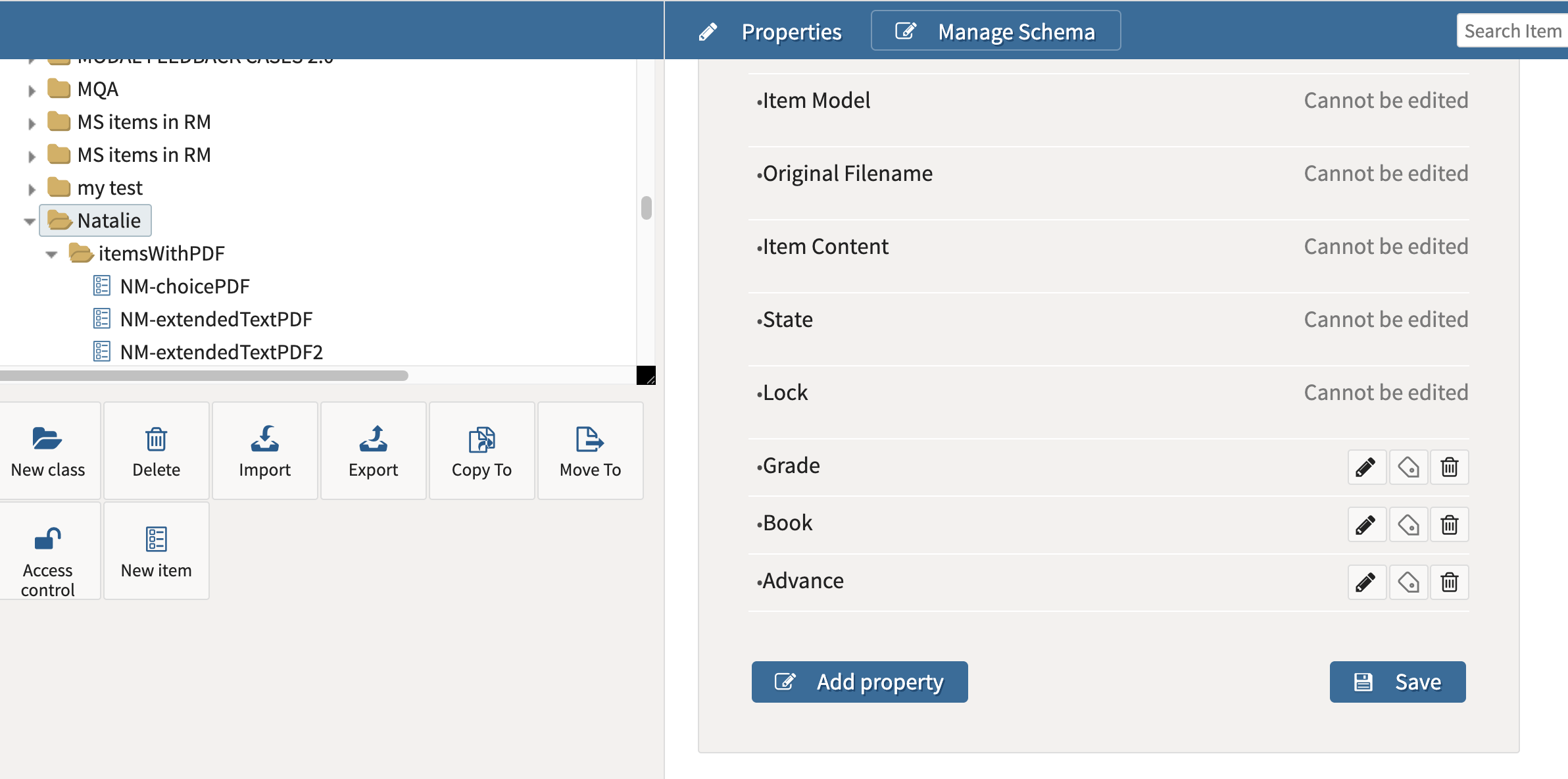
Select the class (folder).
-
Select Manage Schema.
-
Click Add property for each metadata property you want to define for items in the class.
-
Once the properties are set for the class, navigate to individual items.
-
In the item’s properties, add the values for that item into the property text boxes.
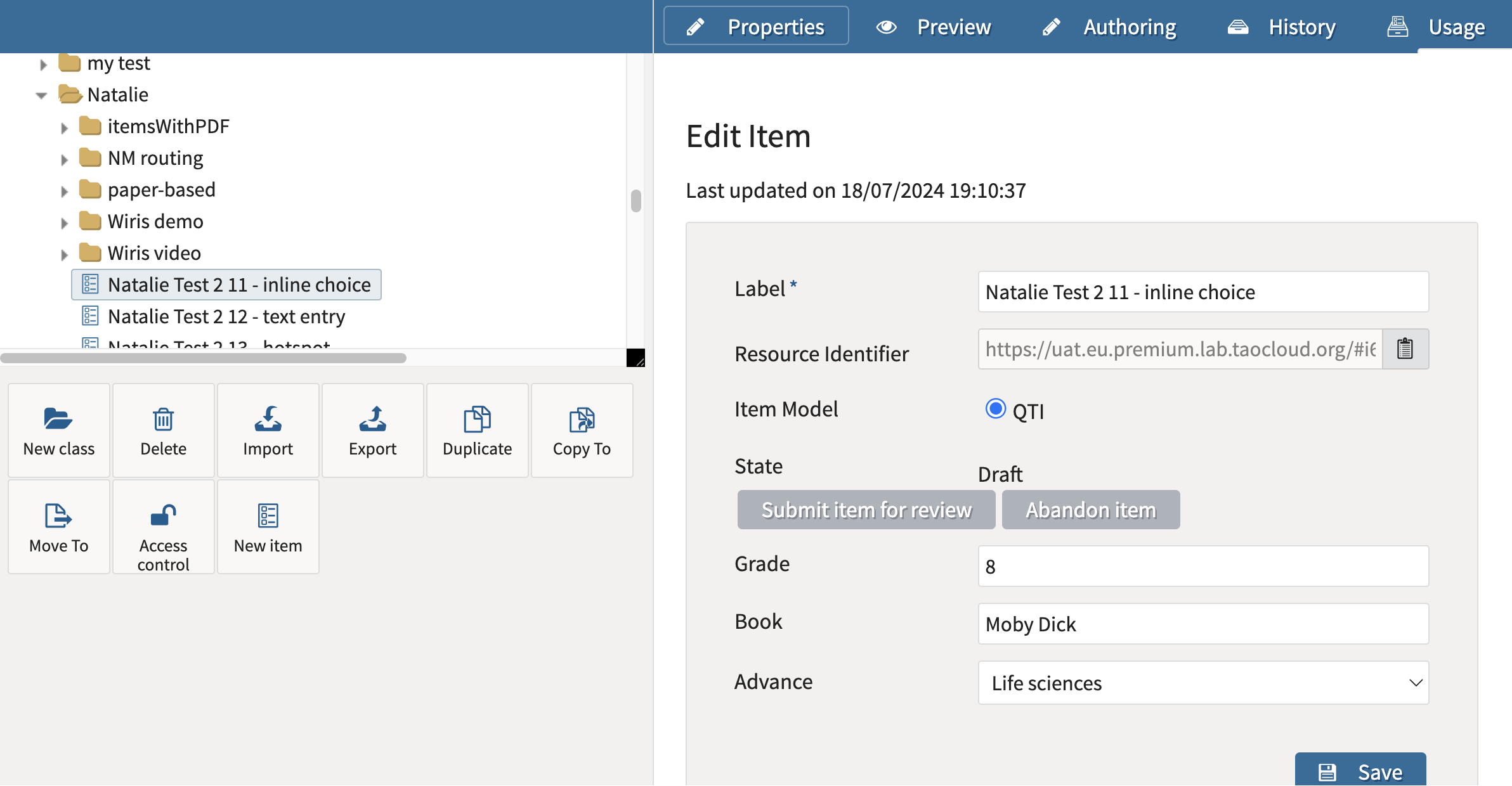
Example of a possible metadata schema in TAO Authoring
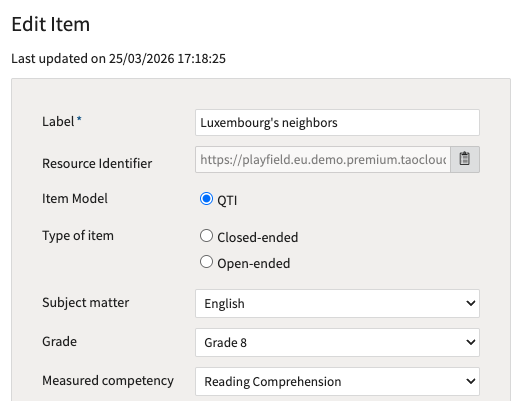
The following graphic displays a schema added to an item.
Data extract example
The metadata in this graphic displays for each itemResults field in data extracts:
{
    "metadata": {
        "Label": "Luxembourg's neighbors",
        "Measured competency": "Reading Comprehension",
        "Grade": "Grade 8",
        "Subject matter": "English"
    },
  ...
},
For more information on itemResults, see the following articles:
3. Design Response Variables and Choice Identifiers carefully
This section pertains to adding Response Variables to an item during item authoring.
For item responses, there are two levels to think about:
-
the response identifier tells you which variable to look at.
-
In TAO result exports, responses appear under
responses.RESPONSE_x, and TAO explicitly states that this value is the response identifier defined for the interaction in authoring. It is editable from the item authoring screen.
-
-
the choice identifier(s) tell you what was actually selected
-
For many closed-ended interactions, that stored value is not the text shown to the learner, but an identifier-based value. TAO’s export reference shows that identifier-type responses are serialized as identifiers, including single, multiple, and ordered values.
-
For reporting purposes, authors should not only ask “What is my response variable called?” but also “What exact code will be stored if the learner selects this option?”
Response identifier steps
Every interaction stores learner responses using a response identifier. In exported data, this identifier becomes the field name that reporting tools use to retrieve responses.
-
Select the item in the item library.
-
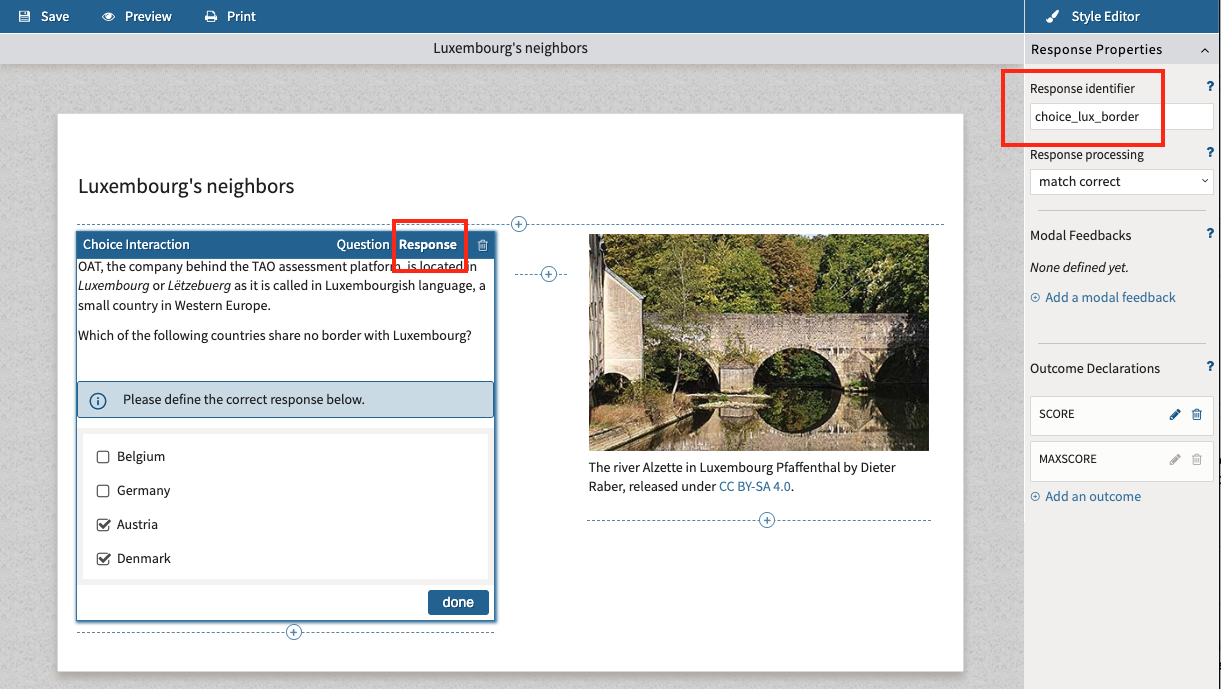
Select the interaction (or response area within the interaction), then select the Response tab.
-
In the Response Properties, add a meaningful identifier to the Response identifier text box.
Rather than accepting generic identifiers wherever possible, choose names that clearly describe the response being collected. For example: responses.choice_lux_border
Choice identifier steps
For many interaction types, the stored response is not the text shown to learners, but the underlying choice identifier.
-
Select the interaction (or response area within the interaction), then select the Question tab.
-
If the response contains multiple choices, select the choice within the list.
-
Under Choice Properties, add a meaningful value to the Identifier text box.
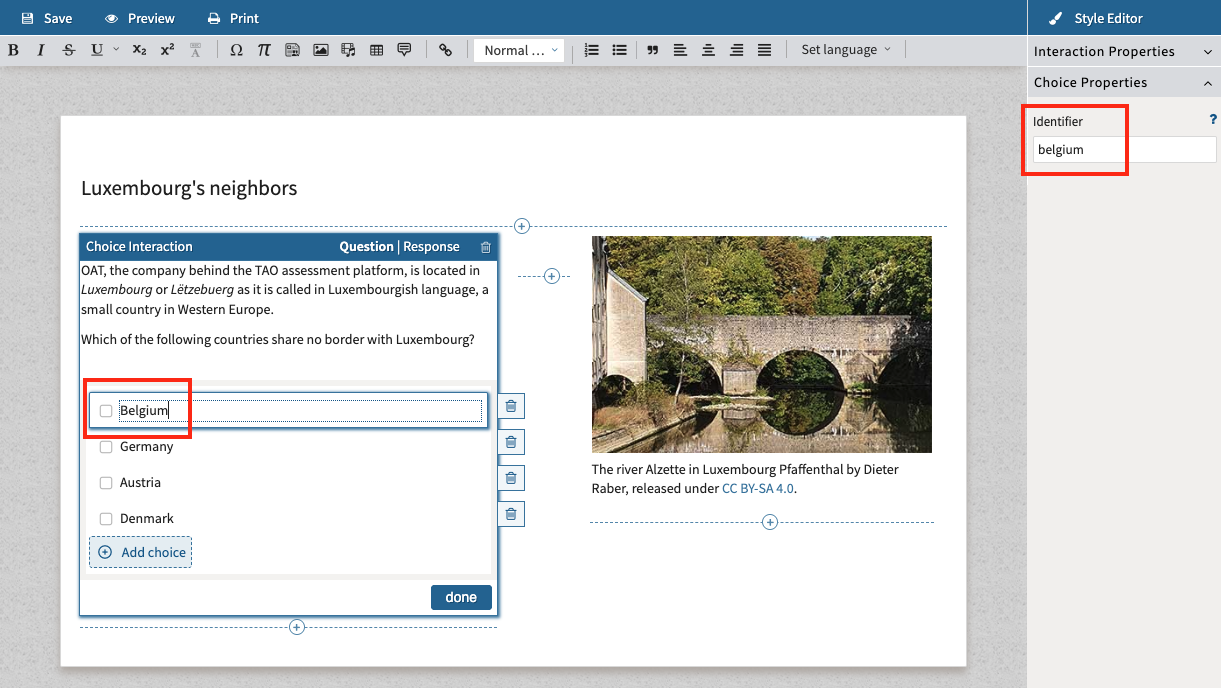
For example:
Displayed to learner:
-
Belgium
-
Germany
-
Austria
-
Denmark
Stored values:
-
belgium -
germany -
austria -
denmark
Data extract example
The responses field in data extract will display according to how these identifiers are labeled.
In the following example, the test-taker selected both “Austria” and “Denmark” choices:
{
  "responses": [
      {
          "choice_lux_border": {
              "correct": true,
              "value": "['austria'; 'denmark']"
          }
      }
  ],
}
3a. Why item response and choice labels matter for cross-item analysis
Consistency becomes especially important when several items measure the same construct.
Examples include:
-
translated items
-
alternate forms
-
parallel assessments
-
grade-specific adaptations
If two items are intended to represent the same concept, their response and choice identifiers should also represent the same concept.
For example:
English item
agreement_level
agree
disagree
strongly_agree
strongly_disagree
French item
agreement_level
agree
disagree
strongly_agree
strongly_disagree
Although the learner sees different text, both items store identical values, making comparisons across languages straightforward.
In contrast, using unrelated identifiers (such as choice_1, option_A, or answer3) requires manual reconciliation before meaningful analysis can occur.
3b. Choosing appropriate naming strategies for identifiers
There is no single perfect naming convention. The right approach depends on whether the priority is technical stability, human readability, or cross-item comparability.
TAO default behavior
TAO’s uses RESPONSE as the standard response variable example in exported data, and generic choice labels such as choice_1, choice_2, etc. So the default pattern is typically functional, but not very meaningful for reporting.
Item ID: item-1
Response ID: RESPONSE
Item content:
Question: Which fraction is equivalent to 1/2?
Choices:
-
choice_1→ 2/4 -
choice_2→ 3/4 -
choice_3→ 1/3 -
choice_4→ 4/5
Stored response if learner selects 2/4:
responses.RESPONSE = choice_1
Here are four workable approaches.
A. Purely technical
Item ID: MATH_001
Response ID: MATH_001
Item content:
Question: Which fraction is equivalent to 1/2?
Choices:
-
MATH_001_A→ 2/4 -
MATH_001_B→ 3/4 -
MATH_001_C→ 1/3 -
MATH_001_D→ 4/5
Stored response if learner selects 2/4:
responses.MATH_001 = MATH_001_A
Advantages
-
easy to generate systematically
-
low risk of collision
-
easy to trace back to a specific item
Limit
-
not very readable for analysts
B. Human-readable
Item ID: reading-main-idea-grade4
Response ID: main_idea
Item content:
Question: What is the main idea of the passage?
Choices:
-
main_idea→ The passage explains why bees are important for plants. -
supporting_detail→ Bees can travel long distances. -
irrelevant_detail→ Some flowers are yellow. -
too_narrow→ One farmer noticed fewer apples one year.
Stored response if learner selects the correct answer:
responses.main_idea = main_idea
Best when exports are reviewed directly by analysts or business users.
Advantages
-
easier to understand in raw exports
-
easier to explain to customers
Limit
-
requires discipline to keep names short and consistent
C. Hybrid
Item ID: RDG_G4_014
Response ID: main_idea
Item content:
Question: What is the author’s main message in this text?
Choices:
-
mi_correct→ Recycling helps reduce waste and protect resources. -
mi_example→ One student started recycling at school. -
mi_detail→ Paper can be sorted into different bins. -
mi_offtopic→ Some bins are blue and others are green.
Stored response if learner selects the correct answer:
responses.main_idea = mi_correct
Usually the most practical option.
D. Cross-item anchored
This is the useful one when different items should still produce comparable values.
English item
Item ID: ENG_G4_021
Response ID: agreement_level
Item content:
Question: Reading every day helps me understand stories better.
Choices:
-
strongly_agree→ Strongly agree -
agree→ Agree -
disagree→ Disagree -
strongly_disagree→ Strongly disagree
Stored response if learner selects “Agree”:
responses.agreement_level = agree
French item
Item ID: FRA_G4_021
Response ID: agreement_level
Item content:
Question: Lire chaque jour m’aide à mieux comprendre les histoires.
Choices:
-
strongly_agree→ Tout à fait d’accord -
agree→ D’accord -
disagree→ Pas d’accord -
strongly_disagree→ Pas du tout d’accord
Stored response if learner selects “D’accord”:
responses.agreement_level = agree
This is exactly the kind of setup that makes cross-language reconciliation possible, because the displayed text changes, but the stored values remain aligned.
4. Overview
A useful way to think about this is:
-
metadata tells you what the item is about
-
response identifiers tell you where to find the answer
-
choice identifiers tell you what answer was given
If reporting will only ever happen item by item, almost any naming scheme can work.
But if there is any possibility that results from several items will later need to be grouped, compared, merged, or correlated, then variable naming must be designed deliberately from the beginning.