
For more information, see Managing your account in the User Guide.
Applies to
-
All TAO Portal users
Prerequisites
-
You must have access to the TAO Portal.
-
For password recovery, your email address must already be verified.
Purpose
This guide explains how TAO Portal users can update their personal account information, including their name, email address, language preferences, and password.
Steps
1. Access your user settings
-
Log in to the TAO Portal (for information on password retrieval, see Step 4).
If MFA has been enabled for your organization, you will be required to enter a verification code after signing in with your username and password.
-
The verification code is sent to your verified email address.
-
The code remains valid for 30 minutes.
-
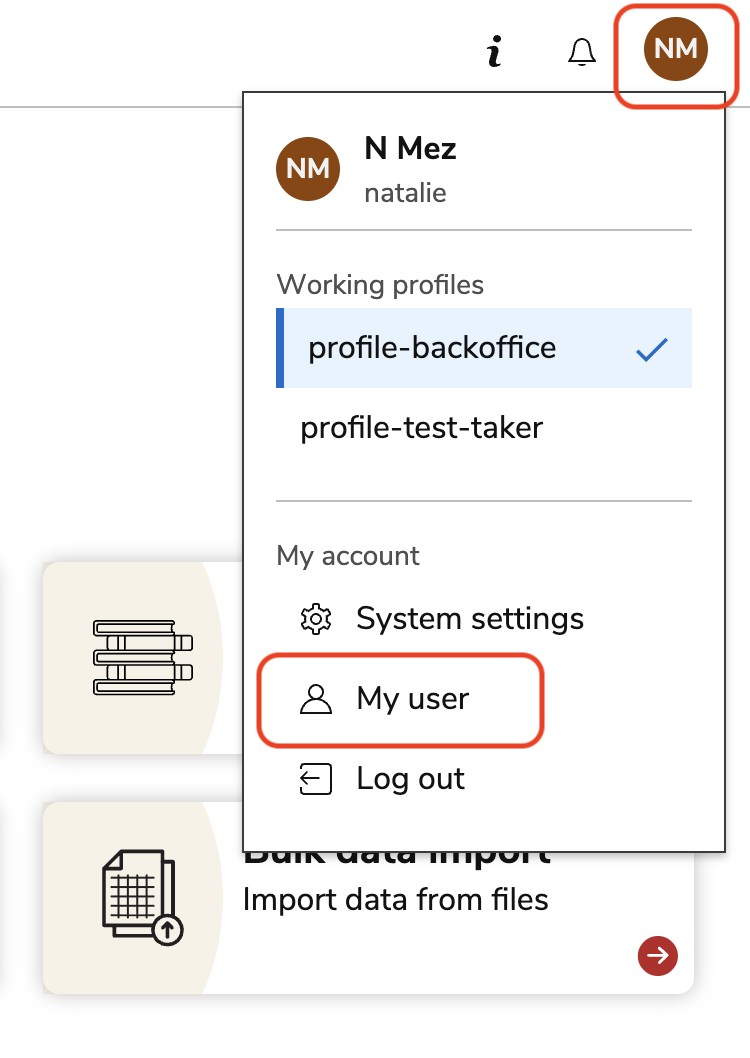
Select the circular profile button in the upper-right corner of the Portal.
-
Select My User from the menu.
2. Update your personal information
-
In the My User Settings tab, update any of the following fields as needed:
-
Name
-
Email address
-
Password
-
Language (the Portal interface and test-taking experience will display in this language)
-
-
Select SAVE CHANGES to apply your updates.
Usernames cannot be changed after a user account has been created.
3. Verify a new or updated email address
-
After adding or changing an email address, check your inbox for a verification email.
-
Open the email and select the verification link.
-
Complete the verification process within one day of receiving the email.
If the verification link expires, an administrator can resend the verification email from the user management page.
4. Reset a Forgotten Password
Password reset functionality is available only for users with verified email addresses.
-
Navigate to the TAO Portal login page.
-
Select Forgot your password?
-
Enter your verified email address.
-
Check your email for the password reset message.
-
Follow the instructions in the email to create a new password.